

How to use Rigid Body Dynamics in Blender 3D 2.50

The new interface and tools of Blender 3d 2.50 will make the learning process for new artists a lot easier, but in the other hand a full change on the interface may confuse old users at a first glance. I my Blender classes, one of my students asked me how to use Rigid Body Dynamics in 2.50. By following the same panels from Blender 2.49 the Rigid Body options should be placed right next to the logic bricks. At the new windows organization in Blender, we will find a window and not a panel called Logic.
In this window we will find the logic bricks and the properties for objects used on the game engine.
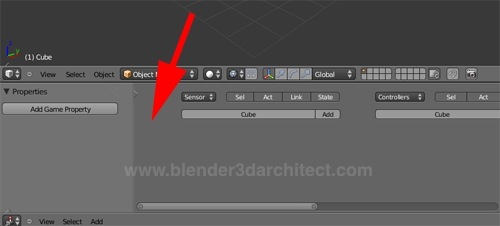
With a quick look around you will notice that the Rigid Body option is missing. Where is it?
After a few minutes I figured out the way to get into the new Physics options in the Game Engine. Before anything, we have to change the render type of Blender to use the Blender Game. If you use the Blender internal render, only the options related with Blender physics will be available. Rigid Body Dynamics is associated with Game Engine.
Change the output render at the top of the interface. I hope that an option to export directly for YafaRay or LuxRender is available in the future, besides POV-Ray.
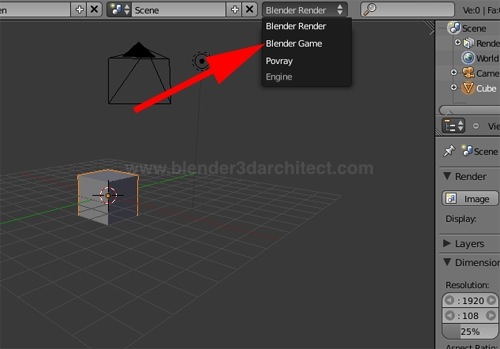
When the Blender Game is selected, go to the Physics panel and we will find an option to choose Rigid Body Dynamics!
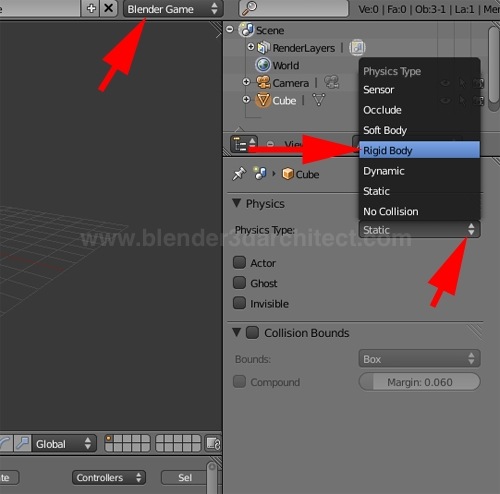
The rest of the setup works just like in Blender 2.49, with options to set collisions and the mass of the object. Now we can reproduce the domino tutorial, using Rigid Bodies in Blender 2.50 as well. The only thing I couldn’t find so far is a way to bake the physics simulation as keyframes. But for real-time animation it works fine.
Even for architectural visualization artists, it’s important to know how to use the game engine, because from time to time a project may be presented as an interactive presentation. This is a feature related with animation, but the scenarios used for those applications may require a few physics simulations. Anyway, it won’t hurt to know a bit more.
To try a test build of Blender 3D 2.50, visit graphicall.org.

Comments
Holy Moses
Thank you for posting this. I may never have figured out where things were moved to on my own 🙂
EmilioSen
Thank you! =)
Virion
I’ve found the way to bake the animation.
go to the top menu bar there choose Game->Record Animation. Then, press “Start” button to start the game and after that when it’s done you just quit the game and the animation is now recorded onto the timeline.
Thanks for the tutorial it’s very useful. 🙂
ghe
hi, may be it’s to late but to bake the animation from the game engine go in the game logic panel (the one with the joystick) then in the menu game check record animation
guy
THANK YOU. I’ve been searching for this.
3DWalker
This will definately help those people who secide to go with 2.5, even when it’s not fully implemented on the game engine yet. Several features in 2.4 series have been lost or not in yet on the new version of blender, mainly cause they started from scratch instead of modifying the existing version they now have to incorperate the rest back into it, and seeing blender runs on python itself as well that means re qriteing the source scripts… Which could take some time. I hope that eventually they cake more care to the game engine, make it better.
Jessica
God thank you soooooooooooooo much, I am new to Blender and have been try to learn the BME and got stuck for like forever, thanks for help me out!!!!!!!!!!!!!!!!!!!!!!!!!!!!!!!!!