

Tips for precision modeling with Blender 3D
This is a common question I always have to answer about Blender; How to model with precision in Blender? Well, first of all we have to realize that Blender is a visualization and animation tool, not a CAD system like AutoCAD or ArchiCAD. It will never have precision tools as good as AutoCAD, just like other 3d suites like 3ds Max or Maya. But, it doesn`t mean you can use a few tips and tools to create models with precision. I know architects do like measurements and are concerned about the dimensions of their models.
That's why I decide to make a small list of things you can do to model with precision in Blender.
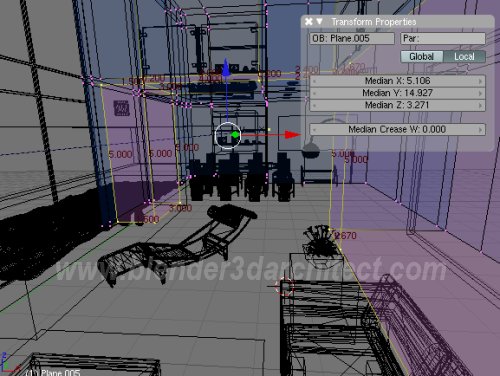
Those are the tips:
- Know how to use the transform properties menu: This is a menu where you can type the position, rotation and scale of selected objects. This menu can be viewed when we press the N key.
- Use the 3D Cursor: We can easily say that this is the key tool to work with precision. With the 3D cursor we can move and place objects exactly where we want, like above a face or aligned with a specific vertex. The best way to work with the 3D Cursor is use the snap tool.
- Use the 3D Cursor and the Snap tool: The snap tool can deal with selected objects, 3d Cursor and the center of objects. For instance, we can place the 3D Cursor at the center of a plane, which could be the floor of a scene, and select a chair model. With a snapping option like “Selection -> Cursor” the object will jump to the position of the 3D Cursor. What part of the object will be used to make the alignment? His center. There is the vertex snap too, which is useful as well.
- Change and manipulate the center of objects: Since the snap tool use a lot the center of the objects to place them, it`s quite important to know how to change the position of the center.
- Always turn on the edge lengths: At the Editing panel we can turn on the display of edge lengths, for selected meshs. This is very useful to check the measurements of a model.
- Use the Grid lines: And the last one, use the CTRL and SHIFT keys to make transformations snap to the grid lines.
If you want to study and start to model in Blender with precision, those are the tools I always use to model in Blender.
Comments
Pierre Perret-Jeanneret
Hello,
your site is a good work, i’ve discovered it for three days . Thank’s you very much for that . I use Blender for two years to designe furnitures . I’have no other modeler/renderer, but it’s suffisant for a beginning . Sometimes I transcode the files in .obj to open in Sketchup and in this one, we can impress some views with precise measurements . All the measerements you check in the transform properties menu in Blender are exactly the same in Skechup . The precision is OK . It’s good to impress some plans that Blender can’t do this .
Regards
Pierre
Alejandro Soto
Excellent post Mr Brito!, this is pretty important because many architects like precision, personaly i don´t think that is really a need have CAD precision when is goning to be visualized in a virtual enviroment, unless Ecotec realy need it.
Leonid Evdokimov
Thanks! That’s exactly what I was looking for last days!