

Free external renderer for SketchUp: LuxRender with SU2LUX!

One of the most used tools to create rough studies and models for architectural visualization is SketchUp, because of the easy to use and speed in which we can create 3d models. So far, if we wanted to render a project designed with SketchUp and with photo real algorithms, we had to turn to commercial applications like the famous V-Ray, largely used with 3ds Max for architectural visualization or turn to tools like Maxwell Render, FryRender and Indigo Renderer. All of them are capable of generating great images, but for artists and students with few resources just Indigo offers a free version.
An option to use open source render engines like YafaRay and LuxRender, would be to use Blender as a middle-ware to import the 3d model and use of the exporters available with Blender to render projects. Well, at least for LuxRender this type of actions won't be necessary anymore, since an user from the LuxRender forums announced the development of a script that connects SketchUp and LuxRender. The script is called SU2LUX and it can be downloaded right now from this link.
The script is already exporting meshes and a few material types like Mattes and Lights. Other tools will be implemented in time, but this is great news for SketchUp users and architectural visualization artists. At the same thread at the LuxRender forums we can find a few rendered scenes created with the exporter and LuxRender.
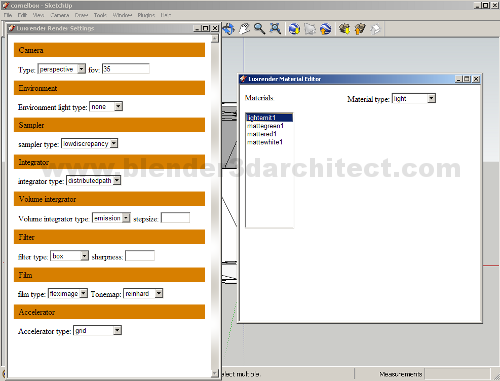
For artists used to get a full set of options to render with LuxRender in LuxBlend, the new script may look a lot simple, but it's only the first version. In the proper time and hopefully with the help of other developers, the toll will look like LuxBlend when we talk about the number of tools available. One of the things I miss the most in this versions if the wide range of materials available in LuxRender, but it's a start as a said.
If you are an architectural visualization artist and uses a lot SketchUp to create quick designs, this script and LuxRender may be a great solution to work on quick renders and visualizations as well. This is a powerful tool capable of use Unbiased render methods to generate realistic images, and it's completely open source and free to use, which make LuxRender a great companion for SketchUp.

Comments
Donovan
Try Twillight Render! It is almost seamless and you can render withing Sketchup. Excellent material editor too. All settings saved int skp file. Runs great. Fast too.
D
123
just came across su2lux while searching for latest su2kt. I’m still running into new trouble with kt, AFTER having had initial success. (grrr)
so maybe i’ll try su2lux.