

New shader to create frosted glass in YafaRay for interior design

The next version of YafaRay is in development and a few weeks I posted an article about one of the new tools, of what will became YafaRay 0.1.2 in the future, which will allow YafaRay users to use photometric lights (IES files). This is a great feature for architectural visualization artists willing to give more realism to their projects and is just one of the new features available to YafaRay. Yesterday I took some time to test another feature added to this development version of YafaRay, and the tool is actually a new shader added to the materials panel called Rough Glass.
With this new shader we can create with only a few mouse clicks frosted glass, which is a common type of glass used for interior design projects, especially commercial projects and stores.
How it works? If you want to try this new shader, here is a link to the forum thread at the YafaRay user forums, where you can find binaries to download and test. I`m using build 420 for this article, and to install successfully this experimental build you have to uninstall all other previous versions of YafaRay. It`s always good to remember that you shouldn`t open any important files with experimental builds like this, because the files can get corrupted. At least make a backup.
So, after installing the build, we can open Blender 3D and at the materials tab we will find a new material:
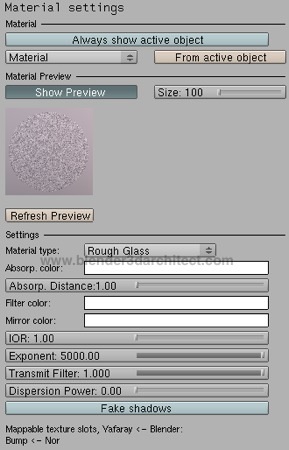
To show how the settings used for the Rough Glass can affects the setup of the material, here is a render test made with two different combinations of IOR and Exponent values:
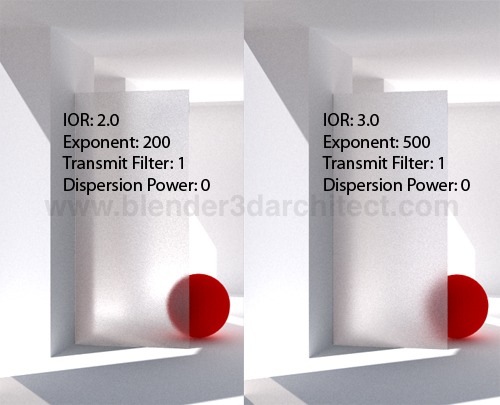
Notice that with a bigger value in the Exponent, the glass loses that transparency. For this scene I had to add a backlight close to the wall, to create a good lighting at the surfaces behind the glass. Even increasing the light bounces and turning on Transparent Shadows a backlight was necessary.
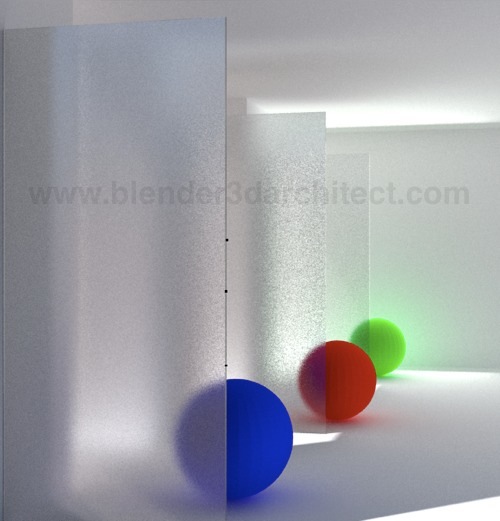
If you want to try the experimental build, expect a few bugs like small black dots on the rendering, like the ones in this render where I added more glass planes overlapping each other.
This is a great addition to the Yafaray renderer, and will help a lot architectural visualization artists using Blender to represent their projects. I hope that YafaRay can get a few extra shaders like this, and get a wide variety of options like the ones offered by LuxRender.
Comments