

Free download of furniture models for architectural visualization

If there is one thing that we really need to keep in a safe place, for architectural visualization, besides a good texture collection, is a library of furniture models to use in interior design projects. This is something useful to speed up the production of any project, because we will only have to model the walls and structural elements like floors and ceilings. For architectural visualization artists that uses Blender 3D, the task to search for 3d furniture models is always a challenge, because most of the high quality models for architectural are available only in proprietary formats like max, the 3ds Max file format.
But, from time to time we can find a great library offering high quality models available in formats like 3DS, DXF or OBJ. All those formats can be imported to Blender and be used in interior design projects. I found a great web site offering those types of models a few weeks ago, which is called Flying Architecture. They offer models created specifically for Rhino 3D, but all models can be downloaded in both 3DM and 3DS file formats.
Let me show an example of a Le Corbusier's armchair downloaded in 3DS from the web site and imported to Blender 3D.
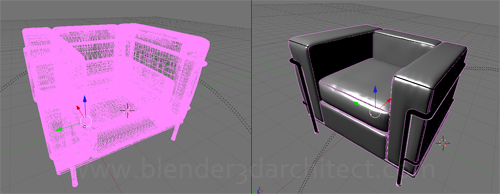
As you can see by the image, the model has a great amount of detail and will look great in projects using YafaRay, LuxRender or Indigo for rendering.
In the web site we can find free downloads of furniture models for:
- Living room
- Office
- Chairs
- Sofas
- Lights
- Bedroom
- Exterior
- Children
- General objects
This is only one example of resource that we can use to populate interior design projects.
In a few months we may have another great resource made available to architectural visualization artists, when the support the COLLADA format is fully implemented in Blender. By the time it's done, we will simple be able to use one of the largest libraries of 3d models in the world, which is the 3D Warehouse. If you ever used SketchUp to create interior design scenes, you may know how easy is to import high quality furniture models from the warehouse and add them to a project. With the full support for COLLADA in Blender, we will be able to download models from the warehouse, export them to COLLADA in SketchUp and add to any architectural visualization project in Blender.

Comments
eMirage
Hi Allan, thanks for the links, at the same time I wanted to tell you that we are working hard to bring a new Hi Quality furniture collections, here’s a link if you’re interessted
http://blenderartists.org/forum/showthread.php?t=168680
Alain
Thanks for this nice link !
I think some of these models are not very precise.
But the corbusiere chair looks very nice ! 🙂
frameless shower screens
One of the ways to add decor to your bathroom is by using shower screens. Most people think of the good old shower curtain to keep water from splashing all over the place, but a shower screen is quickly becoming a popular option.
Fraktal-design
You can easily convert sketchup models using DoubleCAD -it has native skp import and can export models to dxf format . Then you just import the dxf to blender (I only managed to do this with 2.49 correctly) so the door to 3D Warehouse are wide open 🙂 !!!!
Robert_Architecture
Check out Syncronia.com. You can download free BIM and CAD file for Architecture and Interior Design in different formats.