

Blender 3D as a CAD tool: Using the ProCAD script

One of the oldest wishes of artists that uses Blender 3D for architectural visualization is the addition of CAD tools in Blender, to make the modeling of architectural elements easier and with better precision options. A big improvement was made with the addition of new snapping tools in the Apricot project, but we could use a little more options to make Blender get even closer to a CAD tool. Even without native tools that turn Blender into a CAD tool, we have a few scripts that really help and add some great features, available in most CAD tools that can make the difference for the modeling stage of architectural visualization projects.
One of these scripts is the ProCAD from Paolo Provenda, which can add incredible and useful options to Blender. If you want to download the script and install it in Blender, visit this link. Well, most of the script is in Italian and were partially translated to English. I will begin in this article a series of tutorials showing how to use the Script and during the process I hope to finish the translation of the Script to both English and Brazilian Portuguese.
Another thing to notice, is that the 2.6 version of the script doesn`t work with Blender 2.49, at least for me, I`m only managing to make it work with Blender 2.48. The 2.5 version works fine with Blender 2.49.
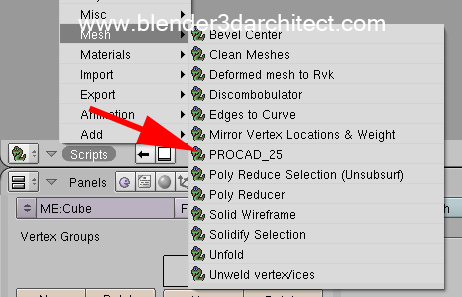
Let`s get started? After you install the script in your Blender 3d scripts folder, a new option will appear in your scripts window at the Mesh options.
Since the GUI of ProCAD has a lot of options, I recommend you to create a horizontal window and place it on the top of your 3D View window to better use the script options.
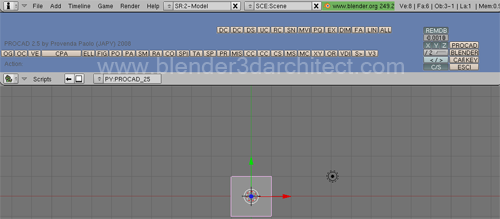
As a way to start using the script, let`s take a look on how the first three button on the left works. They are intended to create vertices in three different ways.
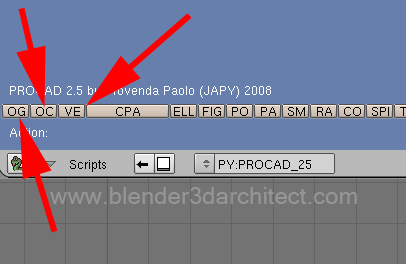
With the default Blender tools we can`t create only a single vertex, which requires the creation of a Mesh object and the edition of the object to erase all vertices and leave only one vertex. We can use single vertices to create 3d models based on edge modeling. Here is what each button does:
- OG: Every time we press this button, a new vertex will be created at the exact same point of the 3d Cursor. The thing to notice here is that each vertex will be created as a new object. So, in order to model using them we will have to either join the vertices (CTRL+J) or just take them as a reference for modeling other objects.
- OC: Here we will have the same action as described in the OG button, but we will be able to choose the exact coordinates in X, Y and Z to create the vertex. Each vertex will be a new object.
- VE: This last option will add vertices just like the OG button, at the 3d cursor point. The difference is that all vertices will be created as a single object, with no need to join them later.
In future articles I will go by each group of functions from this great script, to help artists that want to use tools in Blender that resemble features available in CAD software's like AutoCAD, ArchiCAD and others.

Comments
davx
Hi,
I’d like to let you know that I just tried PROCAD 2.6 (vertical version) with Blender 2.49a and it works.
I just put the “dati_procad” folder and the “PROCAD_26V.py” file in my .blender/scripts/ folder.
Nevertheless, I’m looking forward to your following articles.
Thanks
Allan Brito
Oops!
I can`t believe that I forgot about this folder!
Now it`s working! Thanks davx.
davx
You’re welcome !
Hernando Ramos
Cheers!
Really nice script, tnx for sharing and for your all that good stuff in your blog.
Right now this is very usefull to me, I’m modeling an entire sport center for a video and your blog is my main source for this kind of information about Blender.
Steven
Hi
I was going to have a go at translating the script and/or tutorials/manuals also, do you need some help?
Cheers
Diego
Allan,I’m trying to design parts for my invention will be more easier with this open source project,thank you for the time you are puting in it. But anyway can someone draw this parts in cad so I can manufacture them? I have them precisely made in emachine shop free downloadable program, but they are difficult to reach, I’m overseas. very simple parts 7 of them made of 6 mm clear acrylic mostly angled and discs but the holes for screw must be precise and in the right places as well as relief in certain parts
Best Regards
blender_baby
Hi Allan,
Thanks for posting the tutorial. Needed your help on installing the PROCAD script. I opened it in the text editor in blender and tried saving it. But it gave some errors. Is that the only way to install it? I tried pasting the script in the script folder, but it still did not show up in the script>mesh>
Thanks
Kelly Bellis
Hi Allan,
I’m new to Blender (since 2.65a, now 2.66) but have been an AutoCAD user for over 25 years (primarily in my land surveying business). I found your post on ProCAD and wondered if there was anything like this that is available for Blender 2.6 and above? I’m running Win7 Pro 64-bit.
Thank you very much.
Kind regards,
Kelly
Allan Brito
Hi Kelly,
Unfortunately I don`t know any tool that works like ProCAD on 2.6x. But, I can tell you that there are some Add-ons on development that might get really closed to ProCAD.
When they become more stable, I will post a note on the Blog! Stay tuned 🙂
Regards