

Script that edit and transform Edge Loops in Blender 3D

I was looking into some articles about the release of the new version of 3ds Max 2010, which shows the so called graphite modeling tools. This new set of tutorials are an implementation of the PolyBoost plugin, bought by Autodesk and merged with this new release of 3ds Max. What about Blender 3D? Are there any scripts or plugins that aid in the modeling process? Of course there is! One of my favorite plugins is Geom Tool, which allows us to use a lot of great features in Blender 3D like the possibility to edit and align vertices of objects, without the need of snapping tools.
A few weeks ago I have discovered another great script to use in Blender 3D that could help a lot, in task and projects related to architectural visualization and mechanical modeling. The script is called Loop Tools, and was developed by Crouch. This Python script was created to edit and manipulate edge loops in models that require some level of correction or edition in edge loops.
If you want to know more about the script and how it works, I suggest you to watch this video that describes how Loop Tools work. To download the script, visit this thread at the Blenderartists forums.
When we install the script we will find a new option at the Scripts window. With this small window we can choose from several options to control and smooth the loops.
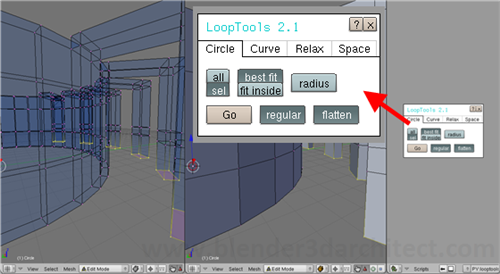
This kind of tool is useful to work with projects that have their spaces organized as in a circular shape. A project with a circular structure and walls could be challenging even for experienced visualization artists. One of the reasons that makes less experienced users prefer to work on CAD tools to create projects involving curved walls, is the fact that it's quite hard to control and distribute elements like windows and openings along those walls.
The Loop Tools script will certainly improve the work on this kind of project, but it still has some limitations. I hope Crouch keep developing the script, as a help with the modeling of those curved objects would be much appreciated. If you have ever experienced problems with the editing of elements like this, I recommend you to try out the script. It's an amazing tool!
Comments