

Blender 3D importing DWG files?

If you work with architectural visualization and 3d modeling with Blender, you probably have faced a problem like receive a full set of technical drawings from a client, in DWG format. And to be able to work and import it to Blender, a middle application like DoubleCAD or another have to be used converting everything to DXF. When you don't have a tool like that, you have to ask the office or architect, to send you the project already in DXF. This is a common problem before an architectural visualization project starts and could be solved partially if Blender had native support to DWG files.
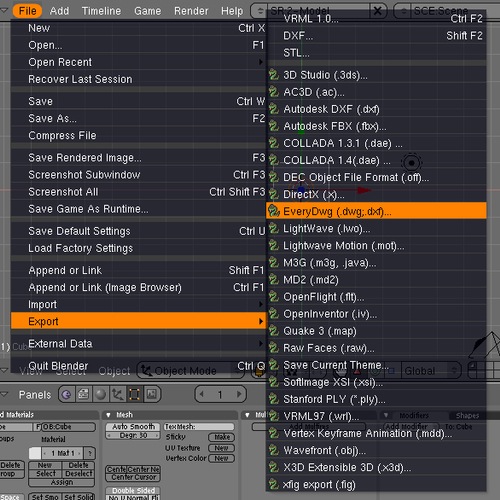
Well, if you were wondering about that, a new set of Python libraries developed by Stani will help you import DWG directly in Blender! If you want to know how to set up the libraries and be able to import DWG files, visit this link. The library is based on the actual scripts that import DXF files, with a similar set of tools and limitations.
Why is so important for Blender to import DWG files?
The ability to import DWG files in Blender wouldn't add much to the daily routine of artists used to work only with DXF files, but could be a great feature for users that want to switch to Blender and replace 3ds Max as the main tool. I don`t know how big is the influence of Autodesk in architectural offices in other countries, but here in Brazil, we have a large number of architects and offices that still use AutoCAD as the main tool to create their projects. Even if those companies and architects choose to not use Blender, freelance artists will need to manipulate those files.
If you already use DXF files or an application to convert to DWG files to DXF, you probably know that a set of technical drawings is never imported with all the elements to Blender. For instance, we have to remove dimension lines, texts, hatches, and other elements related only to CAD and have no use for us in the 3d modeling and visualization process. So, if you are going to open the file to edit it, we could save the file in both DXF and DWG.
Anyway, the DWG support is a great feature for new users and can be something that will make artists used to work with DWG files to try Blender as a visualization tool.
So, go ahead and try it out! I know I will.

Comments
Alain
Thanks for this hint Alan
We use AutoCAD alot as well in switzerland.
I guess I mention that Bricscad is a low price (starting at 315 Euro) CAD software to handle DWG files in a native way and very similar to AutoCAD. It’s avaible for Windows and Linux.
Kind regards
Alain
Arkinauta
Interesting!
Thanks!
stanmarsh
hi Alan,
thanks for this information!
3d renderings
Thanks for this great info! As i am doing rendering as well. With this info, i learn new stuffs!
JP
Good to know! Thanks
karpi
Hello all,
bricsys works on native linux cad – bricscad. Some fully working alpha builds are already aviable here:
http://www.bricsys.com/common/support/forumthread.jsp?id=12335
Carlos
Hello Allan,
I’m a Spanish architect and here AutoCAD is being used a lot (there’re other BIM software that are getting more and more popular, but still not used that much) and since I want to introduce myself into Blender in order to replace 3D Studio, I’d find very interesting to import dwg/dxf files. The problem is that since I am completely new to Blender, I want to start with 2.5 so I don’t have to learn two different interfaces. The problem is that I didn’t find any 2.5 dwg/dxf importer, while 2.49 has an integrated one. Do you know if there’s an option to do that in 2.5 and further? if not, do you know if there will be one?
Thanks!
opensyslab
Yes in Blender 2.5 there is a dxf importer.
You have to go in User pref, clic file, user preferences and go to Add-Ons and at the left clic on import/export. You will see import Autocad DXF (.dxf), check the case to validdate the import export in file menu.
RenatoMM
The hyperlinks don’t open here.
RenatoMM
Sorry. The hyperlinks don’t open here. Don’t you have another link?